How to Protect Your Personal Data on the Internet (Complete 2026 Guide)
The internet runs on information. Every message sent, account created, and purchase made leaves a small trail of data behind. Over time, those trails pile up. They reveal patterns about where you live, what you buy, who you talk to, and sometimes even what you believe.
That might sound abstract. Yet the consequences are not. When personal information slips into the wrong hands, the damage can range from annoying spam to identity theft or financial fraud. Security researchers continue to warn that leaked accounts, stolen passwords, and exposed databases remain common across the web. A single mistake can expose emails, financial details, or even private conversations.
So the real question becomes practical: how does an ordinary person protect their personal data online without turning daily life into a cybersecurity project?
The answer is less dramatic than many expect. Strong privacy habits often look simple. They involve thoughtful choices about passwords, networks, apps, and the amount of information shared online. Over time, those habits form a protective layer around your digital life.
This guide walks through those habits carefully. It explains not only what to do, but why each step matters in a world where personal data has become one of the most valuable resources on the internet.
Understanding What “Personal Data” Actually Means
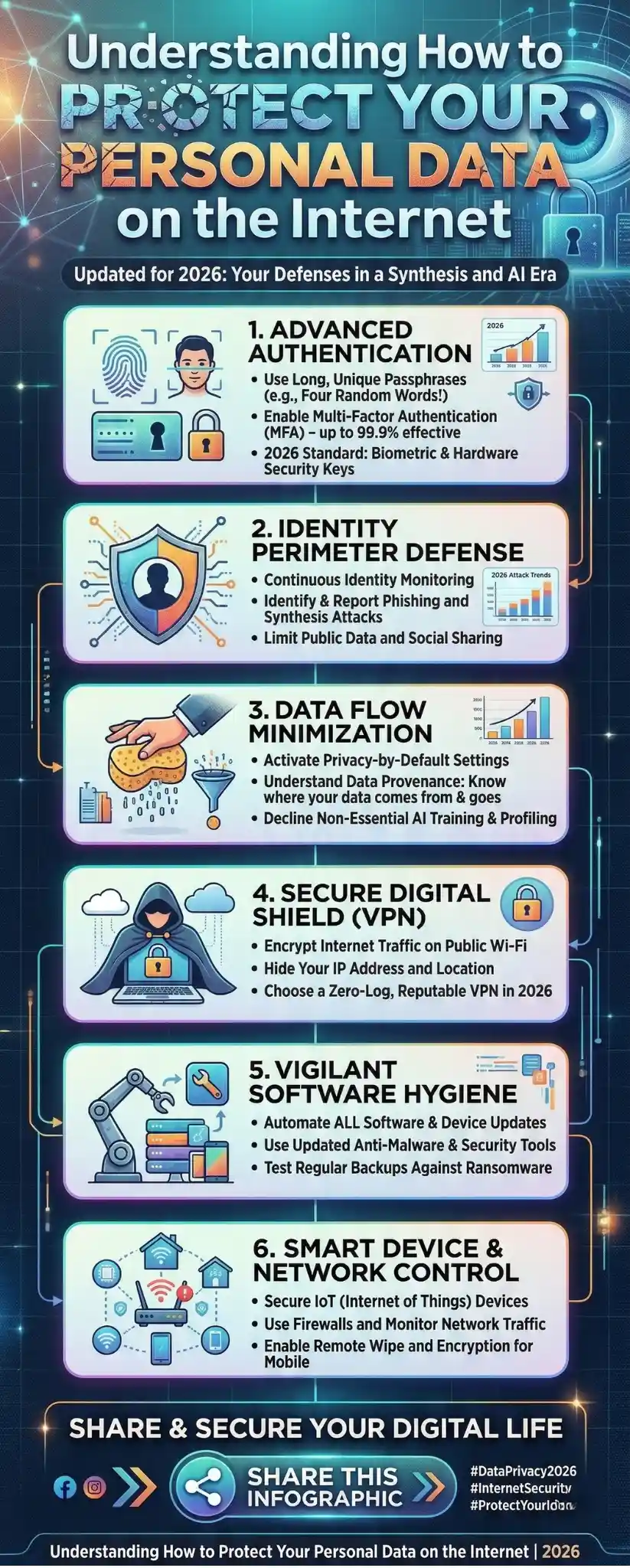
What counts as personal data online?
Many people imagine personal data as obvious identifiers like a passport number or bank account. Those matters, of course. Yet online privacy extends much further.
Personal data often includes email addresses, login credentials, browsing history, IP addresses, location data, and behavioral patterns. Even fragments that appear harmless can combine into something revealing. Researchers have shown that browsing patterns alone may identify individuals with surprising accuracy.
In other words, the internet rarely needs your full identity to recognize you. A handful of digital signals can be enough.
Why personal information attracts attackers
Cybercriminals are rarely interested in a single detail. They look for combinations. A stolen password paired with an email account can unlock dozens of services. A phone number and address may allow targeted scams.
Financial gain sits at the center of most attacks. Stolen information is frequently sold in underground markets, reused for fraud, or combined with other leaked data from breaches.
The uncomfortable truth is that personal information now functions almost like currency online. Once exposed, it circulates.
The First Line of Defense Starts With You

Share less than you think you should
Many privacy problems begin long before hacking occurs. They begin with voluntary sharing.
Social media encourages constant updates. Photos reveal locations. Posts reveal routines. Profiles display birthdays, schools, family names, and workplaces. None of these details seems dangerous alone. Together, they paint a clear picture of someone’s life.
Security experts often recommend a simple test: imagine the information being public forever. If that idea feels uncomfortable, it might not belong online. Limiting the amount of personal information shared is still one of the most effective forms of protection.
Read privacy prompts before clicking “accept.”
Most people skip privacy notices without hesitation. The language can be dense and frustrating. Yet those prompts often explain how companies collect and use personal information.
At a minimum, it helps to glance at whether a service shares data with advertisers, data brokers, or outside partners. Many apps quietly collect location information, browsing habits, or contact lists. Adjusting privacy settings early prevents surprises later.
Passwords: Still the Weakest Link in Online Security
Why strong passwords still matter
Passwords are easy to overlook. They feel routine. Yet they remain the gatekeepers for most online accounts.
Weak passwords create an easy entry point. Attackers frequently use automated tools that test millions of common passwords across leaked databases. If someone uses the same password everywhere, one breach may unlock many accounts.
Government security guidance consistently emphasizes the same idea: create long, unique passwords and enable additional verification when possible.
What makes a password truly strong
Short passwords built around dictionary words fail quickly. Attackers expect them.
A stronger approach uses longer passphrases that combine unrelated words, numbers, and symbols. Length often matters more than complexity. Twelve characters provide far more protection than eight.
However, remembering dozens of unique passwords is unrealistic. That reality leads many users to reuse credentials across multiple websites, which weakens security.
Password managers quietly solve a major problem
A password manager stores login credentials in an encrypted vault. Instead of memorizing every password, the user remembers one master passphrase.
The tool generates strong passwords for each website automatically and fills them in when needed. If used properly, it prevents password reuse and reduces the risk of account compromise.
Two-Factor Authentication Adds a Safety Net

Why passwords alone are not enough
Even strong passwords can leak. Phishing emails trick users into entering credentials on fake websites. Data breaches expose login databases. Malware sometimes captures keystrokes.
Two-factor authentication helps address this weakness. It requires a second verification step beyond the password, usually a temporary code sent to a phone or generated by an authenticator app.
What happens when two layers exist
Imagine someone obtains a password through a breach. Without the second verification code, they cannot access the account.
This additional step may feel inconvenient. Yet it dramatically reduces the chance of unauthorized access. Many major services now encourage or require this extra layer.
Recognizing Phishing Before It Causes Damage
Phishing remains one of the most common threats
Despite years of warnings, phishing still succeeds because it relies on human behavior rather than technical flaws.
Attackers send messages that appear to come from banks, delivery companies, social networks, or coworkers. The message urges the recipient to click a link or open an attachment.
Once the link is clicked, a fake login page often appears. The victim enters their credentials, unknowingly handing them to the attacker.
Small warning signs often appear
Phishing emails frequently contain subtle clues. The sender address may include slight misspellings. The message may create urgency or pressure for immediate action.
Developing a habit of pausing before clicking links makes a difference. When in doubt, visiting the website directly instead of following the email link reduces risk.
The Hidden Risks of Public WiFi
Why public networks can expose personal information
Public WiFi feels convenient. Airports, cafés, and hotels offer free connections that help travelers stay online. Unfortunately, those networks often lack strong security.
Hackers sometimes intercept traffic on unsecured networks. That means they may see websites visited or capture sensitive information if the connection is not properly encrypted.
Safer ways to use public internet
Avoiding sensitive activity on public networks helps reduce exposure. Online banking, shopping, or logging into financial accounts should wait for a secure connection.
Some users rely on a Virtual Private Network. A VPN encrypts internet traffic before it travels across the network, making it far more difficult for others to intercept.
Software Updates Are Not Just About New Features

Why updates matter for security
Software updates often arrive with little explanation. Many people delay them for days or weeks. Yet these updates frequently patch security vulnerabilities.
Attackers actively search for outdated systems. If a vulnerability becomes public before users update their devices, it creates an opportunity for exploitation.
Installing updates promptly helps close those openings. Security patches protect operating systems, browsers, and applications from known weaknesses.
Automatic updates simplify the process
Most devices allow automatic updates. Turning that feature on reduces the chance of forgetting or postponing critical patches.
It may interrupt a workflow occasionally. Still, the inconvenience is small compared with the risks of running outdated software.
Malware Protection and Safe Downloads
How malware steals personal data
Malware refers to malicious software designed to harm devices or steal information. Some programs quietly monitor activity, capturing login credentials or financial details.
Other types encrypt files and demand payment to unlock them. In both cases, the damage often begins with a single careless click.
Prevention requires steady habits
Installing antivirus software remains a practical step for many users. Security tools scan downloads and monitor suspicious behavior on the system.
Yet software alone cannot stop every threat. Avoiding unknown downloads, verifying attachments, and staying cautious with unfamiliar websites still matter.
Securing Your Home Network
Your router quietly protects every device
The router sitting in a corner of the home often receives little attention. Yet it controls access to the entire network.
If the router remains poorly configured, attackers may enter the network and observe connected devices.
Simple steps improve router security
Changing the default router password prevents unauthorized access. Enabling modern WiFi encryption standards, such as WPA3 when available, adds another protective layer.
Regular firmware updates for the router close security gaps just like software updates do for computers.
The Growing Role of Tracking and Data Collection
Companies collect more data than most people realize
Websites gather information about browsing habits, purchases, and interests. Advertising networks track users across multiple sites to build detailed profiles.
Some tracking uses cookies. Other techniques rely on device characteristics that create a unique fingerprint of a user’s browser and system.
This practice allows websites to recognize visitors even when traditional tracking tools are disabled.
Complete anonymity is difficult
Experts often emphasize a realistic perspective. Perfect anonymity online is extremely difficult without significant restrictions on browsing behavior.
Privacy tools can reduce tracking, though they rarely eliminate it entirely. Awareness of how data collection works helps users make better choices about the services they use.
Email Privacy and Data Exposure
Email addresses often become entry points
An email address serves as the gateway to many accounts. Password resets, login alerts, and financial notifications all pass through it.
If attackers gain control of an email account, they may reset passwords for other services and expand access quickly.
Masked email addresses offer a quiet advantage
Some privacy tools generate alternate email addresses that forward messages to the real inbox. These aliases help prevent companies from storing or selling a primary email address.
They also limit exposure if a website later suffers a data breach.
Backups Protect Against the Worst-Case Scenario
Why backups matter for personal data
Even careful users face risks. Devices fail. Malware appears. Accounts get compromised.
Backing up important files creates a recovery path when something goes wrong. Without backups, lost photos, documents, or financial records may disappear permanently.
Cloud and offline backups both help
Cloud storage provides convenience and accessibility. External drives offer independence from online services.
Using both approaches creates resilience if one method fails.
A Short Look at the Future of Online Privacy
Privacy tools continue evolving
Technology companies have begun adding stronger privacy controls directly into their platforms. Some tools help users locate and remove personal information appearing in search results.
At the same time, laws around digital privacy continue expanding. Certain regions now require websites to give users clearer control over how their information is collected and shared.
Still, technology alone cannot solve privacy concerns. Personal awareness remains essential.
Conclusion: Building Everyday Privacy Habits
Protecting personal data online rarely depends on a single tool. It grows from a series of small habits repeated consistently.
Using strong passwords, enabling two factor authentication, keeping software updated, and avoiding suspicious links all contribute to a safer digital environment. Limiting the amount of personal information shared online adds another layer of protection.
None of these steps guarantees perfect security. The internet continues to evolve, and attackers adapt quickly. Yet individuals who remain attentive to their digital footprint dramatically reduce their exposure to risk.
In the end, protecting personal data on the internet is less about technical expertise and more about awareness. People who pause before sharing, clicking, or installing often prevent problems before they begin.
Author Recommendation
If there is one practical lesson from years of internet security research, it is that online privacy is rarely lost through a single dramatic failure. Instead, it slips away through many small oversights. Reused passwords. Careless links. Overshared information. Ignored updates.
What stands out across expert guidance is the value of simple discipline. Long passwords. Two-factor authentication. Software updates. Careful browsing habits. These ideas appear repeatedly across cybersecurity studies and public guidance because they work in the real world.
Another point deserves attention. Many people assume privacy protection requires advanced technical knowledge. In practice, that assumption often discourages action. Most of the strongest defenses are behavioral rather than technical. They involve slowing down before sharing personal details or clicking on unknown links.
The internet will continue collecting vast amounts of data. That reality is unlikely to change soon. Yet individuals still control many parts of their digital footprint.
Treat personal information with the same care as financial assets. Question how it moves through the web. Adjust privacy settings when possible. Over time, those small actions form a reliable shield.
Protecting personal data online is not about paranoia. It is about awareness. And awareness remains one of the most effective security tools available today.